Promote your Telegram channel or group
Add our collector bot to your chat, or connect a bot of your own, and your chat's page goes live: the latest 20 messages appear on it as they are posted, each with the name of who wrote it. A chat that spoke in the last three days sits higher in the group, channel and topic listings than one that went quiet — so the people browsing them meet your chat while it is alive. Four minutes to set up, once.
What you get
Three things a connected chat has that an unconnected one does not.
Live content
The latest 20 messages of your chat appear on its page as they are posted. Unconnected, a channel's page is a snapshot taken on a schedule — up to a week old for a small one — and a group has no public preview to read at all.
More impressions
Freshness is 30% of how we rank. A chat that spoke in the last three days takes the top of that scale and climbs the group, channel and topic listings, so the people browsing them meet your chat while it is alive.
More members
A visitor who lands on your page reads the last 20 messages first, then decides. They see who talks in your chat and what it is about — and join a chat they already know.
How to connect
Four steps, four minutes, once.
Step 1 of 4
-
01
Your channel or group
Which chat do you want on the site? Give us its public handle — the name in its t.me link, without the t.me/ in front of it. The handle is the name of the page the chat gets.
The chat's public @username — the handle in its t.me link.
-
02
The collector bot
The botA collector bot reads the chat and hands the messages to us. Two ways to get one — the collector bot of the site, or a bot of your own.
Add @teleseeker_bot to your chat — as a plain member of a group, as an administrator of a channel. The chat connects on its own, and the status card in the last step says when it is done.
One bot holds as many chats as you like, and the connections you see here are the ones of your bot.
Open @BotFather and send it
/newbotif you have no bot yet — it answers with a token, a long string like123456789:AAE1….The bot's public @username — the handle in its t.me link.
The token BotFather gave you. We keep it while your bot is connected, so the webhook stays up; disconnecting your last chat drops it.
-
03
Add the bot to your chat
What are you connecting? Pick the type — the steps below are the ones for it.
Add the bot to the channel as an administrator — it reads every post of it.
The bot reads every message of the group.
The collector bot of the site has its privacy mode off already — it reads every message of a group.
With a bot of your own, turn the privacy mode of your bot off first — a group needs it, a channel does not.
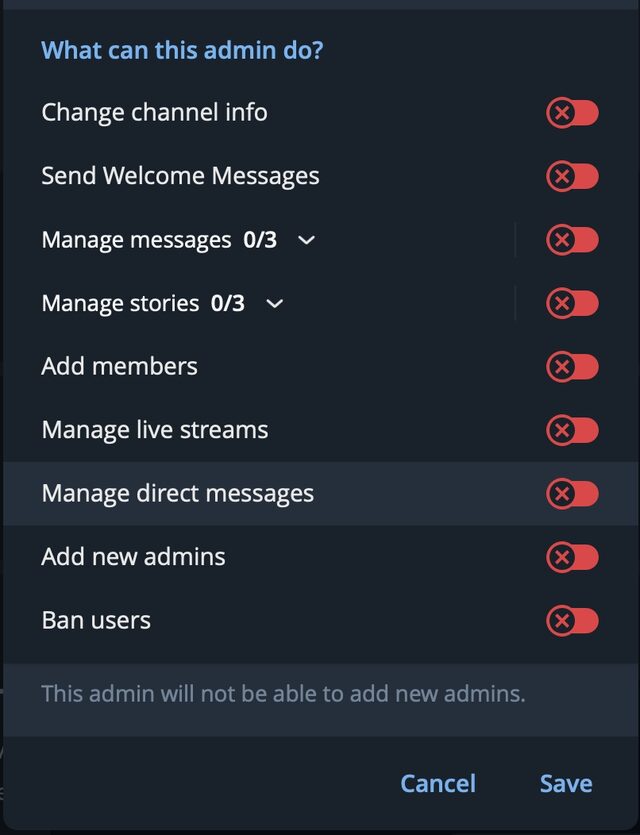
- Add the bot to the channel as an administrator. Every permission on the list can be left off — change channel info, send welcome messages, manage messages, manage stories, add members, manage live streams, manage direct messages, add new admins, ban users.
- An administrator of a channel receives every post of it, whatever the permissions say. The line Telegram adds under the list — "This admin will not be able to add new admins" — is what leaving everything off buys you.
- The channel needs a public username — the handle in its t.me link.
- The latest 20 messages of the chat appear on its page at teleseeker.com as they are posted.
With the collector bot of TeleSeeker @teleseeker_bot the privacy mode is off already: add it to the group as a plain member and it reads every message of it.
- The group needs a public username — the handle in its t.me link.
- The latest 20 messages of the chat appear on its page at teleseeker.com as they are posted.
A bot in a group receives only the messages that mention it by name, unless the privacy mode of the bot is off. With a bot of your own, turn its privacy mode off first:
-
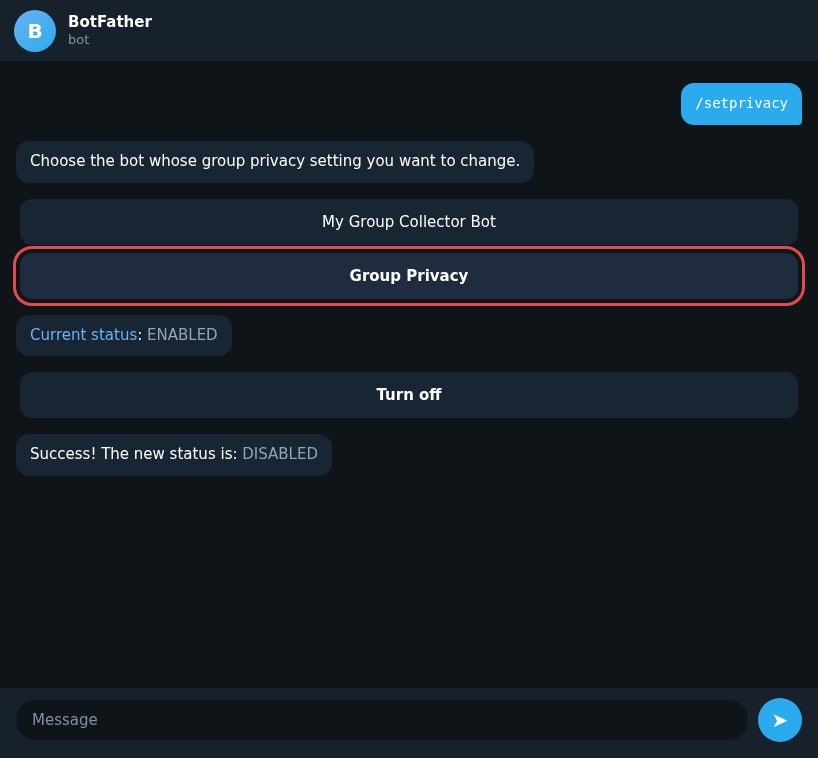
Open @BotFather and send it
/setprivacy. - Pick your bot — the collector bot you want to read the group with.
- Tap Group Privacy in the menu BotFather shows.
- Tap Turn off. BotFather answers that the privacy mode is off.
- Add the bot to the group again — the privacy mode reaches a bot only once it has joined the group after the change.
- The group needs a public username — the handle in its t.me link.
- The latest 20 messages of the chat appear on its page at teleseeker.com as they are posted.
-
04
Connect it
- We point your bot's webhook at teleseeker.com — that is where Telegram delivers its updates. A bot holds one webhook, so if it had one of its own we tell you before we take it over.
- We keep your bot's token while it is connected, so the webhook stays up. Disconnecting your last chat drops the token and gives the webhook back to you.
- The bot writes nothing in your chat — not in a group, not in a channel. It reads the messages and hands them to us, and that is all it does.
This bot already has a webhook of its own. Connecting it takes that address over, and the bot stops delivering its updates there. Tick the box below to go ahead.
Connected
From this moment on we receive its messages as they are posted, and every message that arrives updates the rank of the chat. Keep the bot in the chat — the collection stops as soon as the bot leaves it.
It is a .
How the ranking treats your chat
Our ranking reads three facts: how big the entity is, how recently it spoke, and how much it has to say. The "how recently" reading is empty for a chat that publishes nothing of its own, so we score it on a decaying guess. Connect a bot and the reading becomes real — a chat that spoke in the last three days takes the top of that scale and moves up the group listings and the topic pages.
Connecting does not make a chat louder than it is: a chat that goes quiet for more than two months falls to the bottom of that scale. The ranking follows the chat, not the connection.
Frequently asked questions
What a connection does, what it publishes, and how to stop it.
What does connecting a bot do?

The bot reads your chat directly from Telegram and we publish the latest 20 messages on the chat's page at teleseeker.com, each with the name of the person who wrote it. The ranking reads how recently the chat spoke, so an active chat moves up the group and topic listings.
Do I need to own the chat to connect it?
No. The only condition is that the bot is in the chat. Anyone who can add a bot to a chat can connect it, and the owner of the chat can stop it at any moment by removing the bot.
What happens to the webhook of my bot?
We point it at teleseeker.com, because that is where Telegram delivers the bot's updates. A bot holds one webhook: if it already had one of its own, we tell you before we take it over.
Does the bot write in my group?
No. The bot writes nothing in your chat — not in a group, not in a channel. It reads the messages and hands them to us, and that is all it does.
How do I stop the collection?
Remove the bot from the chat as an admin, or disconnect the chat on this page when it is one of your bot's chats. Both ways drop the messages collected for the chat and take the connected mark off its page.
How many messages of my chat are published?
The latest 20. They are the messages sent from the moment of connecting — a bot cannot read what was said before it arrived.
How do I promote my Telegram channel for free?
By making the chat's page live and keeping it fresh. A connected chat's latest 20 messages appear on its page as they are posted, and freshness is 30% of our ranking, so a chat that spoke in the last three days sits higher in the listings. We do not sell advertising and we never buy subscribers.
How do I know it worked?
The status card in the last step says it. It names your chat and tells you whether the collector bot has brought its messages yet, whether the chat is ready to be connected, whether the bot cannot read the chat and what to do about it, or whether the chat was disconnected. The card refreshes every ten seconds on its own and stops once the chat is connected.